
How to detect HTTPS inspection on a Mac
Use SWG bar to compare certificate trust, identify a local inspection root, and understand what a TLS probe can and cannot prove.
SWG bar · Updated
HTTPS inspection commonly replaces the certificate chain seen by a client with one signed by a root certificate trusted on that device. A browser may still show a secure connection because the inspection root is trusted locally. The useful question is therefore which chain was presented and why the Mac trusts it.
Check one domain
- Install SWG bar and open it from the menu bar.
- Visit the HTTPS website you want to examine, then find its hostname in the Domains view. Record the exact hostname; a page can also load resources from other hosts.
- Open the domain details and inspect its classification, certificate chain, issuer, root, and available evidence.
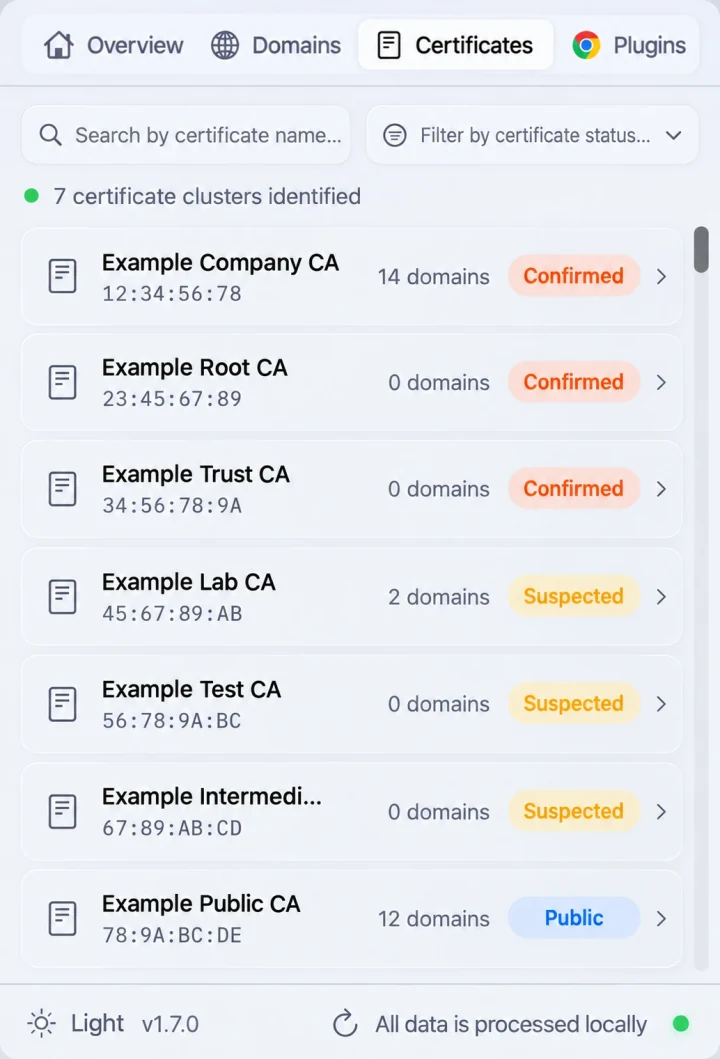
- Use the Certificates view to inspect the associated root certificate. Compare its identity with the roots expected on your Mac or documented by your network administrator.
The product preview below shows the certificate view; its sample values are illustrative, not a measurement of your connection.
Interpret the evidence
SWG bar checks a separate TLS probe using macOS trust evaluation and compares the result with Apple’s public system roots. A chain accepted through a locally trusted root, but not through those public roots, is evidence consistent with local interception or a private PKI.
A company-issued certificate is not automatically proof of malicious activity. Private services can legitimately use private certificate authorities. Read the hostname, certificate chain, and trust result together before drawing a conclusion.
Repeat after a connection change
Record the hostname, time, network, and certificate root before and after a change. Reopen the connection and obtain fresh evidence; an earlier result may describe an earlier route. SWG bar may clear detection history when the network changes, so save the information you need before switching networks.
If the site works but the root does not change, that alone does not demonstrate that inspection stopped. If the probe fails, the failure can have several causes, including routing, DNS, timeout, or certificate problems.
Know the limits
The probe is a separate connection. It does not extract the certificate from Chrome’s live TLS session, and applications can take different routes. A public certificate chain does not prove that all traffic avoids a gateway: the gateway may forward HTTPS without decrypting it, apply a decryption exception, or inspect other destinations.
For the underlying process, read how SWG bar works. To distinguish routing from decryption, read SWG bypass versus a TLS inspection exception.