
SSL Inspection Checker for Mac: Menu Bar Tool to Detect HTTPS Interception
SWG bar is a dedicated macOS menu bar SSL inspection checker: compare macOS System Trust vs. Apple public roots per domain, inspect MITM CAs, and check from Chrome or CLI.
SWG bar · Updated
SWG bar is a native macOS menu bar SSL inspection checker built specifically to detect whether a Secure Web Gateway (SWG) or corporate proxy is decrypting HTTPS traffic on your Mac. Rather than forcing you to inspect browser certificates one site at a time or run manual openssl commands, SWG bar continuously tracks observed domains locally, compares macOS System Trust against Apple’s public root store, highlights MITM root certificates, and shows your overall Domain interception ratio right from the menu bar.
Most “SSL checker” utilities on macOS only test whether a remote server’s certificate is expired or misconfigured. Detecting local SSL/HTTPS inspection (break-and-inspect) on an endpoint Mac is a different problem: your Mac’s Keychain deliberately trusts the corporate inspection CA, so remote SSL scanners and browser lock icons both look green while traffic is being decrypted.
How SWG bar works as a dedicated macOS SSL inspection checker
- Automatic dual trust evaluation: For each observed hostname, SWG bar runs an independent IPv4 TLS probe and evaluates the returned certificate chain twice—once against macOS System Trust (including MDM-installed corporate CAs) and once strictly against public CA roots.
- Clear menu-bar verdicts: Domains trusted by macOS only through a local root CA are classified as Confirmed or Suspected, while unintercepted public chains appear as Public trust path (and internal hosts as Intranet). Learn the exact logic in Confirmed vs. Suspected HTTPS inspection.
- At-a-glance Overview percentage: Open SWG bar → Overview to check your Domain interception ratio—anything above
0%immediately tells you which MITM root certificates are intercepting domains on your Mac. - Local-only privacy: All probing, certificate clustering, and SQLite storage stay strictly on your Mac—no browsing history, URLs, or payloads are uploaded. See SWG bar permissions, local privacy, and probe limits.
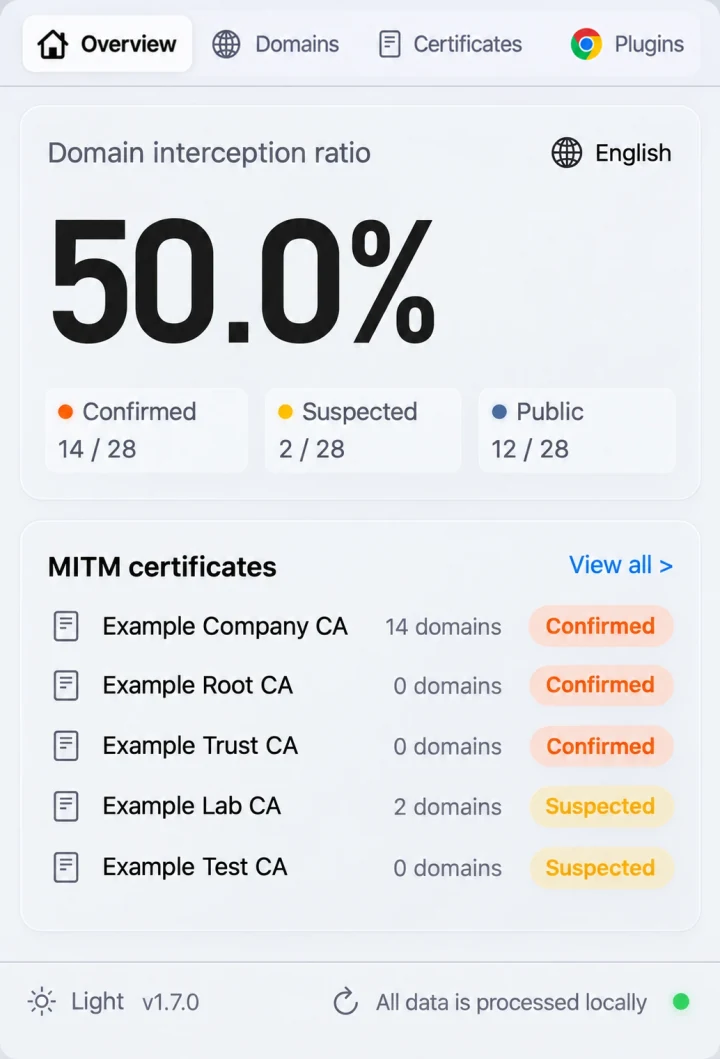
SWG bar menu bar interface on macOS: Overview, Domains, Certificates, and Plugins in one lightweight native app.
Compare SSL inspection checking methods on macOS
| Method | Detects corporate SSL inspection? | Continuous across apps & domains? | Shows MITM root CA clusters? | Supports per-domain bypass & CLI/MCP? |
|---|---|---|---|---|
| SWG bar (Menu bar app + Chrome extension + CLI/MCP) | Yes (dual System Trust vs. Public CA probe) | Yes, per hostname across browsers & CLI tools | Yes, with SHA-256 fingerprints & affected domain lists | Yes (Bypass SWG, swgbar, MCP) |
| Manual browser padlock check | One tab at a time | No | No | No |
Terminal (openssl s_client / curl -v) |
One host per command | No | Manual parsing only | Scriptable manually |
Server SSL expiry monitors (checkssl, App Store monitors) |
No (built for remote server expiry, not local SWG detection) | Remote hosts only | No | No |
| Debugging proxies (Proxyman / Charles) | Injects its own local MITM CA for debugging | Only while routing through local proxy | Shows own proxy session | Not an SWG bypass tool |
Check SSL inspection from Chrome, Terminal, or AI coding tools
SWG bar 2.4.12 (macOS 14+ on Apple silicon, 14-use-day free trial) extends checking beyond the menu bar:
- Chrome toolbar badge: Connect the free SWG bar Chrome extension to view each domain’s latest recorded inspection status, egress interface, and certificate trust right inside Chrome.
- Terminal CLI (
swgbar): Runswgbar overview,swgbar probe <domain> --json, orswgbar certificates listfrom shell scripts or CI diagnostics. See the CLI guide. - MCP server for AI assistants: Connect Claude Code, Cursor, Claude Desktop, or Windsurf via local stdio so your AI coding agent can diagnose TLS errors automatically. See the MCP guide.
- One-click per-domain bypass: When an inspected domain breaks on an authorized network, toggle bypass straight from the same domain detail view—follow How to bypass SWG on a Mac.